
Exchange: Note Templates
Note Templates are a new feature to create preset Note content for various situations, including automated sharing with collaborators and creating additional notes based on desired communication preferences.
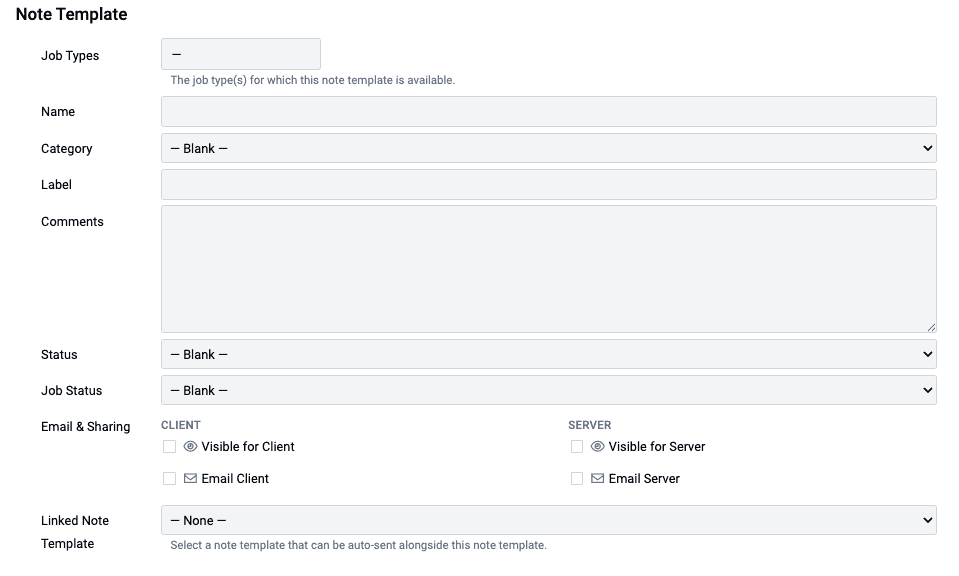
To create a Note Template, go to My Account > Settings > Notes
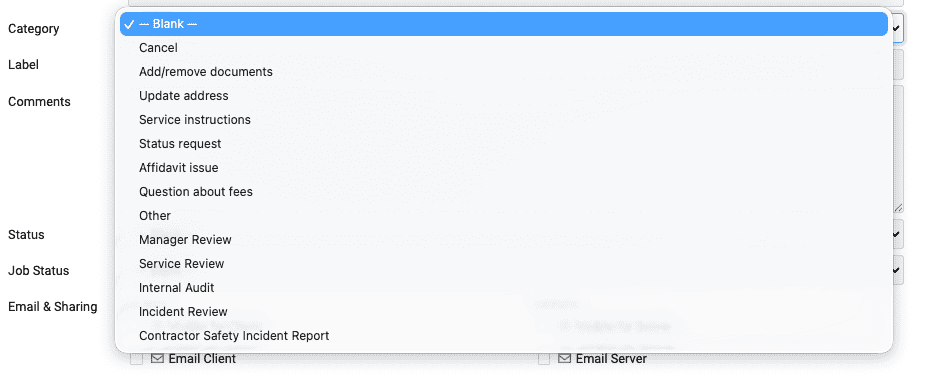
When customizing a Note Template, you can include a name, category, label, comments, resulting job status, note status, and email & sharing preferences.
The following categories are available:
If a particular job status is chosen, when the note is created in the job, the job’s status will automatically update upon saving the note.
Note Templates can be set to only appear in jobs with specific job types and a linked Note Template can be set so that when one note is created, a partner Note Template can also be created (great when needing to send tandem notes to clients as well as contractors)
Note Templates also have their own status, so you and your team can track the progress of the note from NEW to PENDING to COMPLETE

- Updated Jul 1, 2026
Related Articles
- Marketplace: Desktop Attempts and SPARE Act Compliance (California Only)
- Exchange: Client Company Data Fields
- Exchange: Note Templates
- Exchange: As a contractor, what are my obligations to the Exchange?
- Exchange: How to Download the ServeManager App
- Exchange: Minimum Device Requirements for ServeManager App
- Exchange: Mandatory ServeManager Mobile App Usage